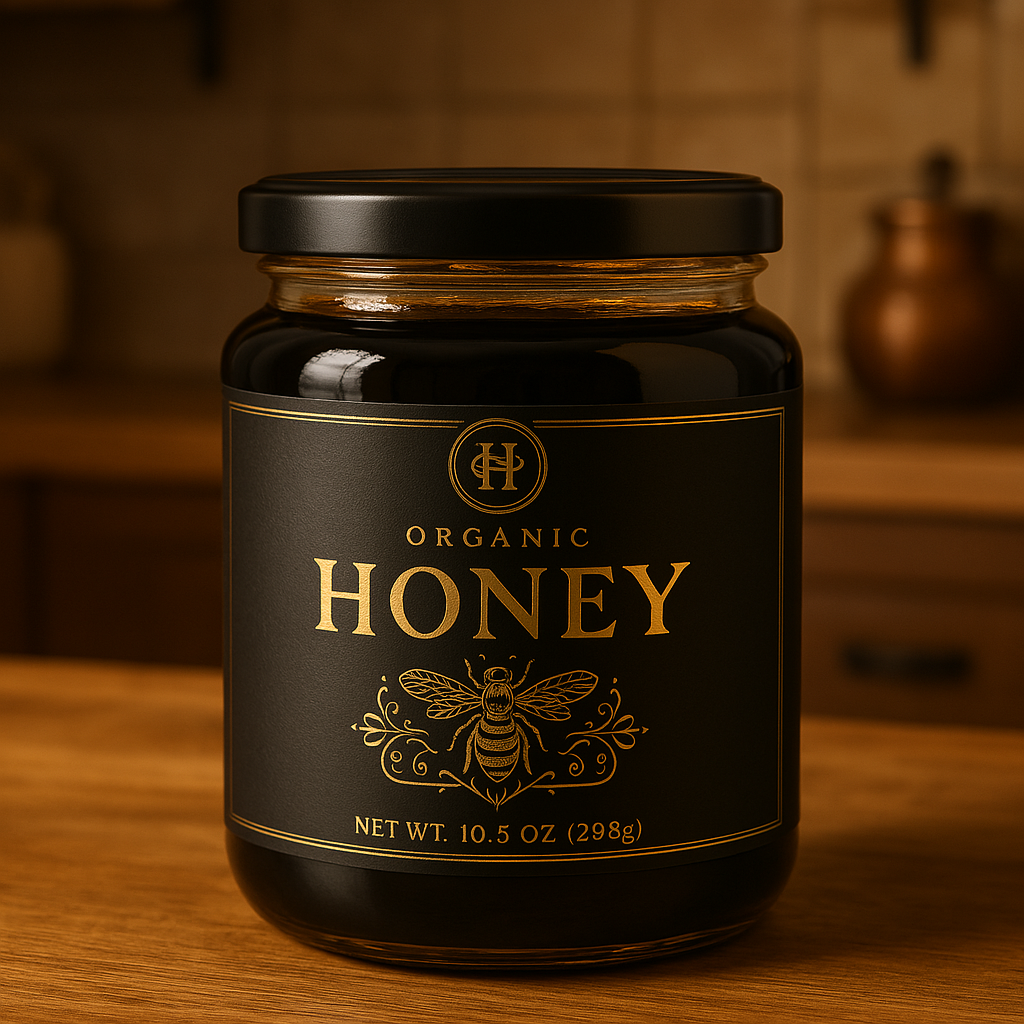
If you want to create packaging images using AI, the secret lies in how you write your prompt. This guide will break it down step-by-step, show you what each piece of the prompt means, give examples, and share templates you can use right away.
Each prompt has core parts you must define:
- {Product}
- {Packaging Type}
- {Design Style}
- {Materials}
- {Setting}
- {Lighting}
- {Angle/View}
- {Dimensions}
- {Text with Location}
Optionally, you can also upload:
- Reference images for inspiration
- Brand logos to be included in the design
Define these clearly to get the best possible packaging images.
Why Generate Packaging Images with AI?
Creating packaging visuals with AI is perfect for:
- Startups testing branding concepts
- Marketers building ads or mockups
- Designers who need quick prototypes
- Ecommerce sellers for product listings
- Creative/research agencies brainstorming new looks
Instead of waiting days or paying hundreds for mockups, you can have visuals ready in minutes.
Building the Perfect Prompt: Piece by Piece
Each prompt has core parts. Here’s the breakdown:
1. {Product}
What the packaging is for.
Examples:
- Chocolate bar
- Skincare serum bottle
- Coffee bag
- Protein powder tub
- Organic tea box
- Handmade soap
- Essential oil bottle
- Granola pouch
- Luxury candle jar
- Kids’ snack pack
2. {Packaging Type}
The style or form of packaging.
Examples:
- Cardboard box
- Glass jar
- Paper pouch
- Aluminum can
- Plastic squeeze tube
- Tin container
- Tetra pack
- Cloth bag
- Blister pack
- Wooden crate


3. {Design Style}
How the design should feel or look.
Examples:
- Minimalist and modern
- Bold and colorful
- Luxury and elegant
- Playful and cartoonish
- Rustic and natural
- Vintage and classic
- Futuristic and sleek
- Eco-friendly and organic
- High-contrast and edgy
- Muted and soft tones
Are you wondering what each example mean? Here you go:


4. {Materials}
What the packaging is made of.
Examples:
- Recycled paper
- Matte black glass
- Glossy plastic
- Brushed aluminum
- Bamboo fiber
- Biodegradable kraft paper
- Frosted glass
- Stainless steel
- Textured cardboard
- Clear PET plastic
5. {Setting}
Where the packaging is shown.
Examples:
- On a clean white studio background
- Sitting on a wooden table
- Inside a cozy kitchen
- Outdoors in natural sunlight
- On a marble countertop
- Against a dark dramatic backdrop
- On a sandy beach setting
- In a rustic farmhouse kitchen
- On a modern office desk
- Next to related products (like coffee beans, fruits)
6. {Lighting}
The mood created by lighting.
Examples:
- Soft natural light
- Dramatic spotlight
- Warm ambient lighting
- Bright and clean lighting
- Cool blue-toned lighting
- Low-key moody lighting
- Golden hour sunlight
- Diffused window light
- Harsh direct lighting
- Backlit silhouette effect
7. {Angle/View}
How the packaging is viewed.
Examples:
- Front view
- Top-down view
- 45-degree angle
- Close-up macro shot
- Side profile view
- Bird’s-eye view
- Low-angle dramatic shot
- Flat lay
- Tilted artistic shot
- Zoomed-in detail shot
8. {Dimensions}
The size or aspect ratio of the final image.
Examples:
- 1024×1024 (square, good for ecommerce thumbnails)
- 1792×1024 (wide, good for website banners)
- 1024×1792 (tall, good for Instagram stories or ads)
- 2048×2048 (high-res square for print)
- 1920×1080 (HD standard)
- 1080×1920 (vertical video)
- 1600×900 (widescreen presentations)
- 2560×1440 (2K monitor screens)
- 800×800 (small ecommerce icons)
- 3840×2160 (4K ultra-high-res)
9. {Text with Location}
What text appears on the packaging and where it is placed.
Examples:
- Brand logo centered on the front
- “Organic Honey” label at the top of the jar
- “Energy Boost” tagline along the bottom edge
- Ingredients list on the side panel
- Nutrition facts on the back
- Product description on the top flap
- Promotional sticker on the lower right corner
- Barcode on the bottom side
- “New Formula!” badge on the upper left
- Awards badge (like “Best of 2024”) next to the logo
Templates You Can Use
Simple Template
A {packaging type} for {product}, in a {design style} style, made from {materials}, placed {setting}, shot with {lighting} from a {angle/view}, in {dimensions} size, with {text with location}.
Example:
A paper pouch for coffee beans, in a minimalist and modern style, made from recycled kraft paper, placed on a wooden table, shot with soft natural light from a 45-degree angle, in 1024×1024 size, with a brand logo centered on the front.

Complete Template
Realistic image of a {packaging type} containing {product}, featuring a {design style} design. Packaging material is {materials}. The scene is set {setting} with {lighting}. Capture the product from a {angle/view}. Emphasize {special feature if any, like 'texture detail' or 'brand logo clearly visible'}. Include {text with location}. Output image should be {dimensions}.
Example:
Realistic image of a glass jar containing organic honey, featuring a luxury and elegant design. Packaging material is matte black glass with gold accents. The scene is set inside a cozy kitchen with warm ambient lighting. Capture the product from a 45-degree angle. Emphasize the intricate label design and glossy texture. Include the brand logo centered at the top. Output image should be 1024×1024.

Advanced Template
Hyper-realistic rendering of a {packaging type} for {product}. The design should be {design style}, using {materials}. Background should be {setting}, styled with props like {optional props if any, e.g., "coffee beans scattered around" or "lemon slices beside"}. Lighting must be {lighting} to enhance {key visual effect, e.g., "material texture" or "color vibrancy"}. View the product from a {angle/view}, focus depth should be {focus details, e.g., "sharp on logo, blurred background"}. Include {text with location}. Image dimensions should be {dimensions}.
Example:
Hyper-realistic rendering of an aluminum can for an energy drink. The design should be bold and colorful, using brushed aluminum. Background should be outdoors in natural sunlight, styled with props like sports equipment nearby. Lighting must be bright and clean to enhance color vibrancy. View the product from a front view, focus depth should be sharp on logo, blurred background. Include “Energy Boost” tagline along the bottom edge. Image dimensions should be 1792×1024.

Quick Placeholder Purpose Chart
| Placeholder | Purpose |
|---|---|
| {Product} | What the packaging holds |
| {Packaging Type} | Shape and type of packaging |
| {Design Style} | Visual style for the branding |
| {Materials} | Material look/feel for realism |
| {Setting} | Environment the product is placed in |
| {Lighting} | Sets mood and makes material/design pop |
| {Angle/View} | Defines how the viewer sees the product |
| {Dimensions} | Controls size and framing of the final image |
| {Text with Location} | Specifies branding/text placement on packaging |
Use Cases by Customer Profile
1. Entrepreneurs and Startups:
- Test packaging ideas quickly before production
- Present professional-looking product pitches to investors
2. Ecommerce Sellers:
- Create Amazon/Etsy listing images without a real photoshoot
- Launch products faster with virtual mockups
3. Marketing Teams:
- Build campaign visuals for ads, banners, and socials
- Run A/B tests on packaging designs
4. Creative Agencies:
- Rapidly generate client mood boards
- Offer multiple concept directions without full production cost
5. Product Designers:
- See packaging ideas in different environments/materials
- Speed up the prototyping phase
Practical Example: Create Packaging Images Using Uploaded Examples
Basic Idea
- User uploads:
- Image 1: Example of packaging design (could be a jar, box, pouch, etc.)
- Image 2: Example of scenario/background (like a wooden table, outdoor scene, marble counter, etc.)
- Optional: Upload a brand logo to integrate.
- Prompt uses the two example images as visual inspiration, not direct copies.
Complete Prompt Template
Use Image 1 as inspiration for the packaging design style, shape, and material.
Use Image 2 as inspiration for the setting, lighting, and environment.
Generate a realistic image of a {packaging type} containing {product}, styled in {design style}, using {materials}.
Integrate the uploaded brand logo {if uploaded} in {text with location}.
Capture from a {angle/view} angle, emphasize {special feature if any, like “label texture” or “glass reflection”}.
The output should match the aesthetic blending of both images.
Final image dimensions: {dimensions}.
Example Usage
Use Image 1 (Aesop jar) for clean packaging style inspiration.
Use Image 2 (bathroom sink) for background and lighting inspiration.
Use Image 3 (Principia brand) for brand logo.Generate a realistic image of a frosted glass jar containing face cream, styled in a minimalist and modern design, using frosted glass material.
Integrate the uploaded brand logo centered on the front.
Capture from a 45-degree angle, emphasize soft reflections on the glass surface.
Final image dimensions: 1024×1024.

Final result:

So, yeah, now you know how to basic “photoshop” …
Final Tips for Best Results
- Be specific: Vague prompts lead to generic results.
- Mention textures and materials: Adds realism.
- State angle and lighting: Changes the mood dramatically.
- Specify dimensions: Helps match the final output to your project.
- Add props if needed: Contextual props make images more real.
- Include text and logo placement: Ensures brand identity is front and center.
- Use reference images or brand logos: Upload them to better guide the output.